How to configure and use CSpell
We use Code Spell Checker (CSpell) to check for spelling issues in Kore.ai product documentation.
We've added 1200+ words to our custom dictionaries to avoid false positives. You must use it with our config rather than running it on default settings.
Configure CSpell to work in VSCode Editor
-
Clone koreaidocs-cspell-config repo.
-
Install streetsidesoftware.code-spell-checker VSCode extension.
-
Configure CSpell as described in this internal video. It'll let CPsell extension use the custom dictionaries.
Use CSpell in VSCode editor for everyday authoring
For everyday authoring, technical writers use the spell checker in VSCode when authoring content. Click View > Problems and then click on Spell Checker.
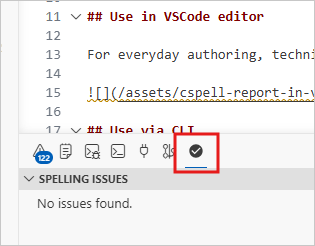
Use CSpell with the same dictionary anywhere else
Fetch the latest updates of the cloned CSpell repo. It gets you the latest custom dictionaries and spell-check rules.
Use case: You want to use cspell outside the repo. For example, I use it on standalone .md files in my Downloads folder.
Just copy the .cspell.json file that you create here into a different repo or folder on your local filesystem.
Resolve CSpell-reported issues
In our cspell output, note the following:
-
Some typos need an update in the docs. For example, misspelt words or use of British English.
-
Ignore some issues. Two examples are:
- When we mask a URL using
xxx, then let it be. No update required. - Some valid words in Kore docs that must remain as is. I add such words to our custom dictionary, so that CSpell doesn't flag these words the next time.
- When we mask a URL using
-
The report also contains some
forbiddenwords that we don't want to use in docs. For example, future tense will, time-sensitive writing currently, colloquial usage, and more. Treat these as typos and rewrite the sentence to not use these words.
To get new words added to our custom dictionary, share the .mdx file's URL with me.
Use via command line for bulk checks
Editors, repo owners, or manager can use the same via CLI to check repo health. Native config via json file. The following are a few CLI examples for common use cases.
| Use case | Command | Remarks |
|---|---|---|
| Check one file | npx cspell --config <path to .cspell.json> <path of MD files> | |
| Recursively check files in the current folder | npx cspell --config <path to .cspell.json> | |
| Recursively check MD files in the current folder | npx cspell --config <path to .cspell.json> "**/*.md" | |
| Recursively check MD files in the current folder and save the output in a local file | npx cspell --config <path to .cspell.json> "**/*.md" > <path of a local file> |